Posted on Leave a comment

How to Create a Spooky2 Program

Follow the steps to create your own program and add it to your custom database.

step 1

Select File -> Create Program.

Step 2

It’s good to name your program something like “Cancer Throat Sweep XX” because it will show up when searching for “cancer”, “throat” and “sweep”.

Step 3 – Enter your frequency

Now let’s enter the frequency, eg: 20,180,200,300; you can also enter a very powerful command in this field along with your frequency, eg a list of commands: xxx-yyy (frequency sweep) – this is where you enter a sweep between two frequencies way – xxx for one frequency and yyy for another, if you want to scan in ascending order, enter the lower frequency first, then the hyphen (scan command), then the higher frequency, example: 100-200

For downward sweep, enter the higher frequency first, then the hyphen, then the lower frequency, example: 200-100

=xxx (custom dwell), for any frequency you can specify a different dwell time than the default you want to apply to the rest of the frequencies, just type the equal sign (dwell command) followed by the dwell time in seconds , example: 200=600

Wx (Waveform): After the frequency you want to use a different waveform, just type W followed by the waveform number as shown in the table below; eg: you want frequency 10 to use a square wave, 10 W2.

Gx (Gate): After the target frequency or command, type G followed by 1 to turn the gate on, G followed by 0 to turn it off, example: G1, G0

Ax (Amplitude Amplitude): After your target frequency or command, type A followed by the voltage you wish to use, example: A05

Ox (Offset Offset): After your target, for positive offset types, a capital O followed by the desired value as a percentage of amplitude instead of voltage. Lowercase o for negative offset types. Example: O00 if 0% offset is required. o20 if a -20% offset is required.

Px (Phase Angle): After your target, type P followed by the desired value.

Lx (Light Wavelength): Spooky2 allows you to directly input the light wavelength. Enter L followed by your wavelength in nanometers (nm). Spooky2 will automatically convert it to the highest harmonic frequency your generator is set to transmit. CL can be used as a constant for Out 2.

Fx (Factor): Specify your desired value for the frequency factor of Out 2.

Cx (Constant): This is the value of the frequency constant for Out 2.

Mx (MW Factor MW Factor): Insert M before molecular weight/molar mass to convert to frequency.

Bx (Base Pairs Factor): Insert a B before the base pair entry to convert to frequency.

Example: You have six frequencies – 100, 200, 300, 400, 450 and 600. You want 100 and 200 transmissions to have a default dwell time of 3 minutes, and 300 transmissions of 10 minutes, all using a square wave with an amplitude of 9 volts and an offset of 0. The frequency is: 100 W2 A09 O00, 200, 300=600.

Also, you want 400 to sweep to 450 with a sine wave in 30 minutes. The frequency is: 400-450=1800 W1.

Finally, you want the 600 again to use a square wave as the default dwell. You also need an amplitude of 5 volts and a positive offset of 2.5 volts (ie 50% of the amplitude). The frequency is: 600 W2 A05 O50.

Step 4 Dwell time.

This is the amount of time (in seconds) that you want to transmit each frequency in the group. If you’re not sure what this should be, 180 seconds is a good default. Note that you can specify a single frequency deviation from this default by entering a simple command.

Step 5 Program Description

You can add comments that will be included in the search and displayed in the Program Description pane. Don’t worry if you get a text error when entering a collection, you can edit it later by selecting the Edit Custom Database command from the Database menu. You also have the option to manually open your custom file in Notepad and edit it there. Then you can save your program. After the Spooky2 database reloads, you will see your new program.

Welcome to watch the following youtube video demonstration ->

Posted on Leave a comment

How to Run the Spooky2 Terrain Detox Program

Terrain Detox should be the first step in any spooky2 frequency healing, which is helpful and essential. Terrain Detox not only helps you get rid of fluke and parasite toxins, but also deeply detoxifies to get rid of any heavy metals or other substances. You can find Terrain Protocol in Spooky2 Preset, run it for 7 to 11 days before running other healing programs will have more effect. Running Terrain in remote mode with Spooky2 is the most convenient way, and it can run continuously 7×24.

If you have a generator, you can run Terrain in three ways:

  • remote mode
  • Plasma Mode/Remote Mode
  • Contact Mode/Remote Mode

If you have two generators, there are two ways to run Terrain with both generators:

  • Plasma Mode + Remote Mode
  • Contact Mode + Remote Mode

Note: Patients with renal insufficiency can choose the Terrain program with reduced power to reduce the workload of the kidneys.

Posted on Leave a comment

Tips for Keyword Search of Spooky2 Program

Sometimes when you search for a program by typing a specific keyword in Spooky2, you may not find any results, at this point you will have to try different spellings as words may be spelled differently from British English to American English Different; typing partial keywords to search is usually more effective than full words; for example, “normal” will find “normalize”, and “stimulat” will find “stimulate”, “stimulatory”, and “stimulation”.

Also, search Wikipedia for the disease to see if it has another name; for example, if you search for Zika Fever in the Spooky2 software, there will be no results, but if you use Dengue Fever as a keyword, you will Find the relevant frequencies.

You can also look for the source of a health problem and then use the Spooky2 frequency to locate it alone; for example, the cause of most thyroid nodules is unknown, but iodine deficiency can cause thyroid nodules; chronic inflammation of the thyroid gland (Hashimoto’s disease) causes decreased thyroid activity and may also cause thyroid nodules; so, you can search for both iodine and Hashimoto for thyroid nodules.

Posted on Leave a comment

Spooky2 Program for Multi-vitamins and Minerals

Vitamins and minerals are essential nutrients to maintain our health, and they are involved in many unavoidable metabolic processes in the body. Different vitamins play their respective roles in the human body to keep the body healthy and strong. What’s more, minerals regulate various physiological functions of the body, and an adult needs at least 100 mg of macrominerals and less than 15 mg of trace minerals per day to support the body’s needs.

Previously, we could only absorb enough vitamins and minerals each day through food and supplements. Thanks to our introduction of molecular weight frequencies, we are adding more and more vitamin and mineral frequencies to our database, and now you can also get these nutrients “for free” with Spooky2.

Spooky2 Multivitamin and Mineral Program

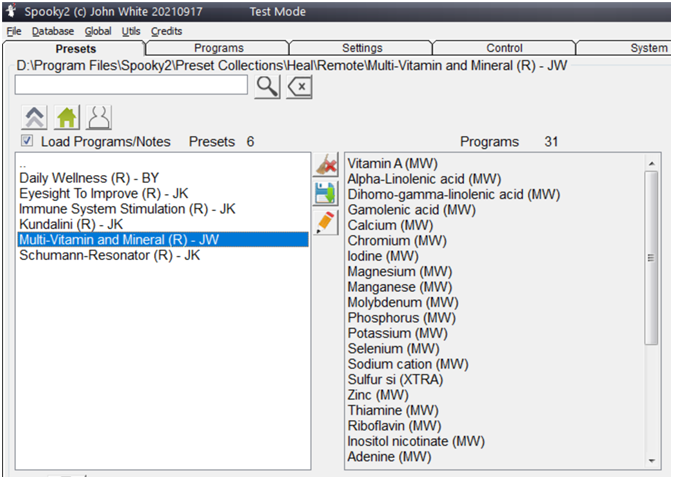
Multi-vitamin and Mineral (R) – JW Preset is a remote program of all essential micronutrient vitamins and minerals to meet your daily needs. The preset time is 4 hours from 1:00am to 5:00am so you can easily get these vitamins and minerals during your sleep.

To load the program into your -XM, open your Spooky2 software and select “Heal” under the “Preset” tab, then select the “Remote” remote, connect the Spooky2 Remote to the BN port of the Spooky2 Boost, and then , search and double click to select Multi-vitamin and Mineral (R) – JW Preset, click the “Control” tab at night and press “start”, after connecting to the computer, the preset will automatically start at 1:00 am . If you run this program in standalone mode with GX, but you need to manually click start every day and make sure not to loop it.

Frequently Asked Questions :

1. Does the Spooky2 Remote blink the red LED light when running a multivitamin and mineral preset? Whether or not the LED remote control light flashes depends on the number of frequencies. This preset contains very large frequency numbers, and according to how the remote works, the light does not seem to light up when the frequency numbers exceed 5MHz. So it’s perfectly normal for your remote lights to be “off” when running a multivitamin and mineral preset.

2. How does GX know the time and start the preset at 1:00am? The GX doesn’t know the time, it’s the Spooky2 software that is responsible for scheduling the presets or programs, if you want to start a preset at a specific time, you can connect your GX to a computer and use the scheduling feature in the Spooky2 software.

Posted on Leave a comment

Spooky2 Frequency Healing for Bone Fracture Recovery

Fractures occur when a bone is struck or crushed with more force than it can handle, usually by accident. Fracture patients often experience local pain, swelling, inconvenience of movement after trauma, skeletal deformity, and abnormal movement. In addition, serious accidents can lead to multiple fractures or shock, which can be life-threatening. There are three main reasons for fractures:

1. Direct violence – force applied directly to part of the bone that results in a fracture in the injured area, usually with varying degrees of soft tissue damage, for example, if the wheel hits the lower leg, a fracture occurs at the point of impact.

2. Indirect Violence – Indirect pressure can also cause fractures, compression or burst fractures of the vertebral bodies occur when a person falls from a height and lands on their feet.

3. Cumulative Strain Injury – Long-term, repetitive, minor direct or indirect injuries can lead to fractures in specific parts of the limb, also known as fatigue fractures, and some people may be prone to fractures from long walks.

In addition, some fractures can lead to serious complications, which can lead to amputation and death in the most severe cases. Complications of fractures fall into two categories: early and delayed. Early complications include shock, fat embolism, compartment syndrome, deep vein thrombosis, and infection; delayed complications include delayed bone union and nonunion, complex regional pain syndrome, and heterotrophic ossification. There are four recommendations for therapy to accelerate bone repair:

1. Physiotherapy – The ultimate goal of helping a fracture is to restore maximum function of the injured limb, therefore, there are three very important basic principles: repositioning, immobilization, and functional exercise.

2. Focus on your diet – As a fracture patient, your diet should include vegetables, fruits, protein, and water. In particular, calcium, vitamin D, and protein are important in the bone healing process, so make sure you focus on food sources rich in these nutrients, such as leafy vegetables, broccoli, fish, meat, yogurt, nuts, and seeds.

3. Quit smoking – People who smoke may experience delayed bone healing, and sometimes, this can even lead to the development of non-union fractures or longer periods of healing.

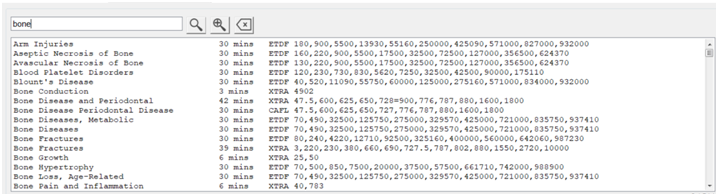
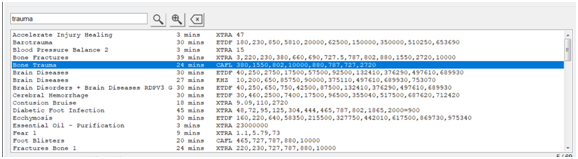
4. Spooky2 Frequency Therapy – We can use Spooky2 to help accelerate fracture healing, on Spooky2 Generator-X or -XM, search with “bone” or “trauma” as a keyword, and load some bone trauma programs, as shown below , perform frequency therapy.