We have better take care of our body in order not to burden our lover, family and society due to illness.
Sincerely Recommend Spooky2/MiraMate/Lifewave Frequency Health Care devices, we also has professional nurse to provide health care and nutrition advice (Inquiry Click Here).
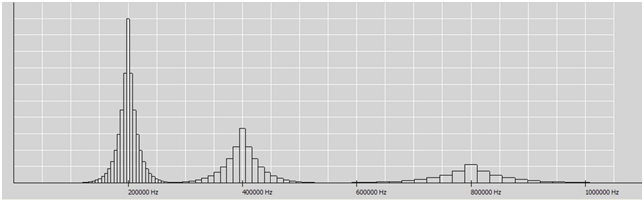
A carrier is a fixed frequency, if you turn this frequency on and off very quickly, you can create more frequencies, another word for this fast switching is “modulation”. When you modulate the carrier frequency, you create multiple frequencies on either side of the carrier frequency, these frequencies are called “sidebands”, and the modulation can set the distance between the sidebands.
Carrier Sweep applies each frequency only once, but it applies it for at least 3 minutes, with each frequency being tapped thoroughly.
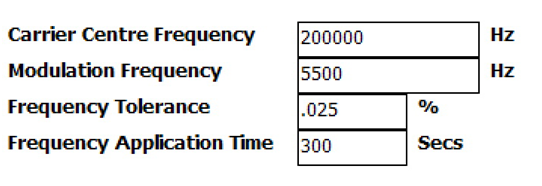
The carrier scan in Spooky2 can be customized by the user, the carrier frequency will receive most of the power, so choose a frequency that is in the center of the frequency range you wish to locate, the modulation frequency sets the distance between the other frequencies, the higher modulation frequency will cover more Wide range, but with increased sweep time, frequency tolerance sets the maximum distance a frequency can deviate and still be valid. When creating a custom carrier scan, pay attention to the scan duration, which is the time it takes to complete the scan, which can often extend to hours if settings are accidentally changed.
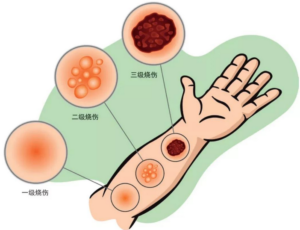
Pulsed electromagnetic field (PEMF) therapy is a safe, non-invasive method that has long been used to speed burn healing by increasing blood flow, building more collagen for the skin, and regenerating tissue. Skin burns cause skin cells to die, and PEMF therapy affects cell behavior by inducing electrical activity that stimulates cell regeneration. When the body receives energy, the cells receive energy, which accelerates the natural healing process.
Pain and tissue inflammation often accompany burns, and fortunately, many studies have demonstrated the effectiveness of PEMF in suppressing inflammatory responses at the cell membrane level to reduce pain. PEMF therapy restores cell membranes and minimizes the leakage of harmful inflammatory chemicals to surrounding tissues, and it also directly reduces the formation of inflammatory substances by stabilizing calcium levels in lymphocytes.
PEMF therapy also promotes the repair of burn scars, it increases the production of collagen fibers by activating dermal fibroblasts, which help firm the skin. PEMF therapy not only promotes the healing of skin injuries and skin burns, but can also be effective in helping to relieve sagging skin and other age-related problems.
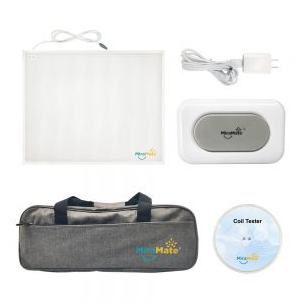
Pulsed Electromagnetic Field Therapy’s Miramate’s Big Magic Mat is a safe and effective magnetic pulsed PEMF device to treat Skin Burn. It works by sending very brief magnetic pulses to the area of your burned skin that produce a low and absolute Safe current frequencies that give them more energy to repair damage, improve circulation and stimulate the growth of stem cells, Big Magic Mat is designed and optimized for prolonged treatment. Most existingPEMF units only apply a single unidirectional pulse, the Big Magic‘s frequency is applied in one direction for ten minutes and then changed direction for another ten minutes, meaning your body is balanced and not magnetized. On the other hand, Big Magic Mat is more flexible and practical, it uses material PVC, which is lightweight, easy to clean, waterproof, provides comfort and durability, and you can use it directly on your skin without worrying about causing any allergies. The size is also large enough to cover the injured area, and in simple terms, Big Magic does speed up the healing of burns.
When the body encounters the electric field pressure of the Spooky2 feedback scan, it changes its own electric field through the autonomic nervous system, resulting in changes in skin conductivity, heart rate and electrical signal behavior. After the Spooky2 biofeedback scan is completed, it is saved as a frequency list , to deal with the imbalanced energy frequencies in your body later. Spooky2 has two devices for biofeedback scanning: Spooky2 Pulse and Spooky2 Generator-X.
Using Spooky Pulse
There are three types of scans in Spooky2 Generator-X, namely GX TENS Scan (using TENS pad), Sample Scan (using Sample Digitizer) and Scalar Scan (using Spooky2 Scalar). Scans from the Spooky2 Generator-X record changes in the electrical signal, and if there is a frequency in your body that resonates with the pathogen, a subtle change in the electrical pattern will indicate a hit was detected and will be recorded in the scan.
Using Spooky Generator-X
There are three types of scans in Spooky2 Generator-X, namely GX TENS Scan (using TENS pad), Sample Scan (using Sample Digitizer) and Scalar Scan (using Spooky2 Scalar). Scans from the Spooky2 Generator-X record changes in the electrical signal, and if there is a frequency in your body that resonates with the pathogen, a subtle change in the electrical pattern will indicate a hit was detected and will be recorded in the scan.
Step 1: Save to database
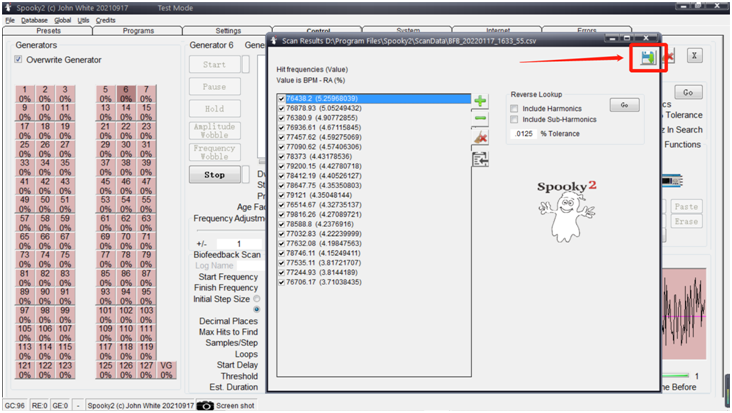
1. After the scan is complete, a window will pop up showing the scan results, click the Save button and save your scan results as a program.
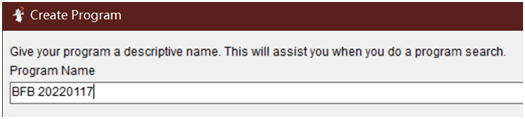
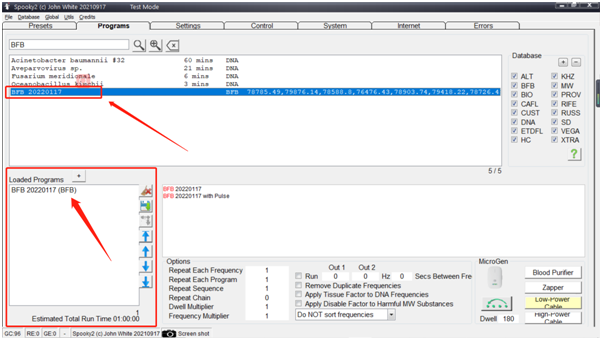
2. Give your scan a name to make it easier for you to search, the default name is “BFB_the date”.
3. You will see the frequency entered in the frequency field/square.
4. If you wish, you can enter text in the program description, the default description is your scan time.
5. Click the Save button in the upper right corner of the window, and when it asks if you are sure you want to save and exit, click Yes.
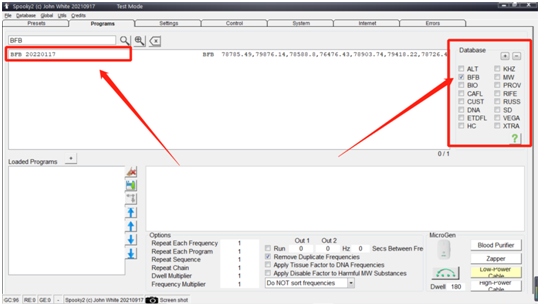
6. Then you can go to the Programs tab, just tick the program of “BFB” and view the scan result.
STEP 2: RUN THE SCAN RESULTS – You can start running your biofeedback scan results directly after the scan.
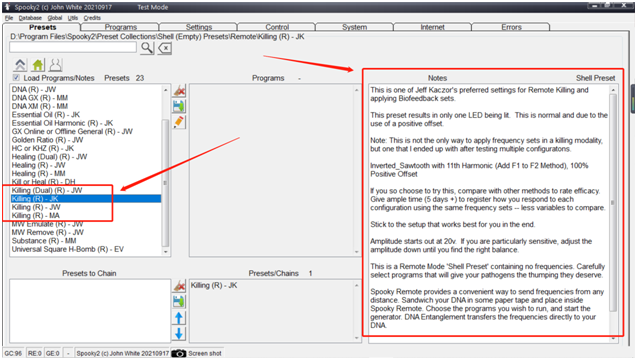
1. Under the Presets tab, select the Empty-Shell preset, select the transport mode (contact, remote, plasma) and the “Killing” preset, please read the instructions on the right to select The preset that works best for you. For plasma mode, you can use the Spooky Plasma Advanced (P)–JW preset.
2. Go to the Programs tab, search for the “BFB…” name of the scan result and double click to select it, you will see the name of the scan in the loaded program pane.
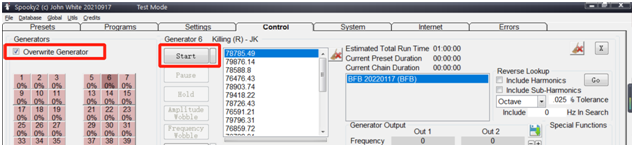
3. Go to the control tab, tick “Overwritten”, click the generator button, then press start, the runtime channel button will turn green.
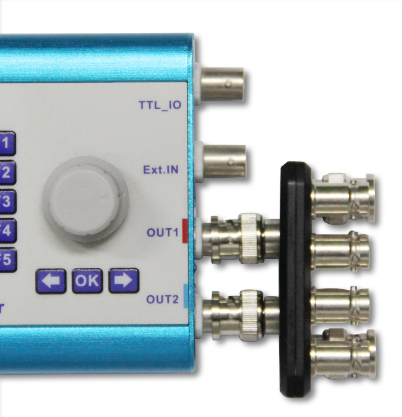
For the generator itself, there are two separate outputs: Out1 and Out2, both of which can generate unique frequencies using separate waveforms, offsets, voltages, etc. Typically they are used together (by boosting) to double the voltage range – from 20vac to 40vac. For XM, it’s a generator, so as above there are only 2 ports. For the GX, it’s actually two generators in one. So there are 4 ports, two for each independent generator. As for boost, without this you’d have a hard time combining the outputs of Out1 and Out2 into one device, and while there are ways to do this, boost makes it easy.
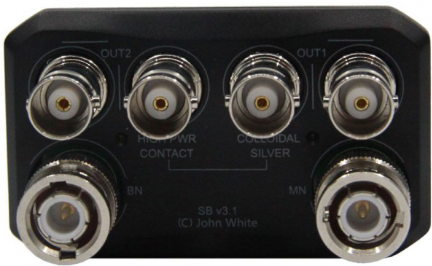
For ports on boost, they look like the following:
Out 1 – This is a direct path to the Out1 port of the generator it is connected to, it is useful to be able to isolate this port without having to remove the boost.
Out2 – Same as above.
MN: Magnetic North – This combines Out1 and Out2 to maintain polarity so that positive is positive and negative is negative. This works with the original black (MN) remote, which is magnetically aligned with the same magnetic field as north on the compass. This magnetic field is positive and is attracted to the north of the earth. The port is rarely used because the magnetic north pole has been shown to be the opposite of life processes; while it may help kill pathogens faster, it can cause severe discomfort to the host.
BN: Bio-North (North of the Earth) – This combines Out1 and Out2, inverting the polarity so that a negative signal is produced on the positive rise of the waveform and vice versa. This works with the original white (BN) remote and the current version of the black remote 2.0. The magnetic field direction of these two remotes is the same as the magnetic field direction of the earth’s north pole, that is, the negative magnetic field. Negative magnetic polarity has been shown to be beneficial to life processes.
High Power Contacts – This is a female BNC connection like you would find directly on a generator, it is wired the same way as a BN port and will produce a negative value when the waveform goes positive and vice versa. In contact applications, polarity is not a factor, so this fact is a debatable point; however, it is useful to know if someone is using a device with a specific polarity (such as Spooky Radionics) outside this port. This port allows you to double the voltage by properly combining the two outputs, when the voltage is doubled you square the power (4x) to provide enough power to overcome the resistance of the skin and provide a useful contact application.
Colloidal Silver Port – This is a female BNC connection similar to a high power port, however, there is a 1000 ohm resistor in series, which limits the current flow, providing more stable operation when used to make CS. As an added bonus, it reduces the effects of low frequencies (below 10kHz) when they resonate with nerves and muscles. Many people find this port very useful when conducting contact sessions that include such frequencies. This is a better approach than lowering the voltage, which can cause the application to waste energy without enough energy to penetrate the skin and into the body.
To combine the effects of the dual voltage Out1 and Out2, the Inverse+Sync option must be used for Out2. When Inverse+Sync is not used on Out2, the outputs of Out1 and Out2 are combined using frequency addition (not unlike what happens when recording two people talking at the same time). This allows you to output Out1 and Out2 to one device, whether it’s a remote, a radio, etc… without having to connect each output to twice as many devices.
Also, be careful not to use multiple connections at the same time, otherwise, they will split the power, for example if I have two remotes plugged into both the BN and MN ports, and then plug the contact bars into the high power port and hold them, all three Each device will divide the voltage and end up with 1/3 of what you think they get. Aside from not being a good master in terms of voltage, it’s likely to run a remote in an inefficient configuration on the MN port.
Boost is not recommended for use with BFB as the other connection point will act as an antenna, absorbing ambient noise and injecting it into the circuit. The GX is sensitive enough to measure this noise, so whether the noise is loud enough to interfere with a BFB scan is another question entirely and really depends on the environment you’re scanning in.
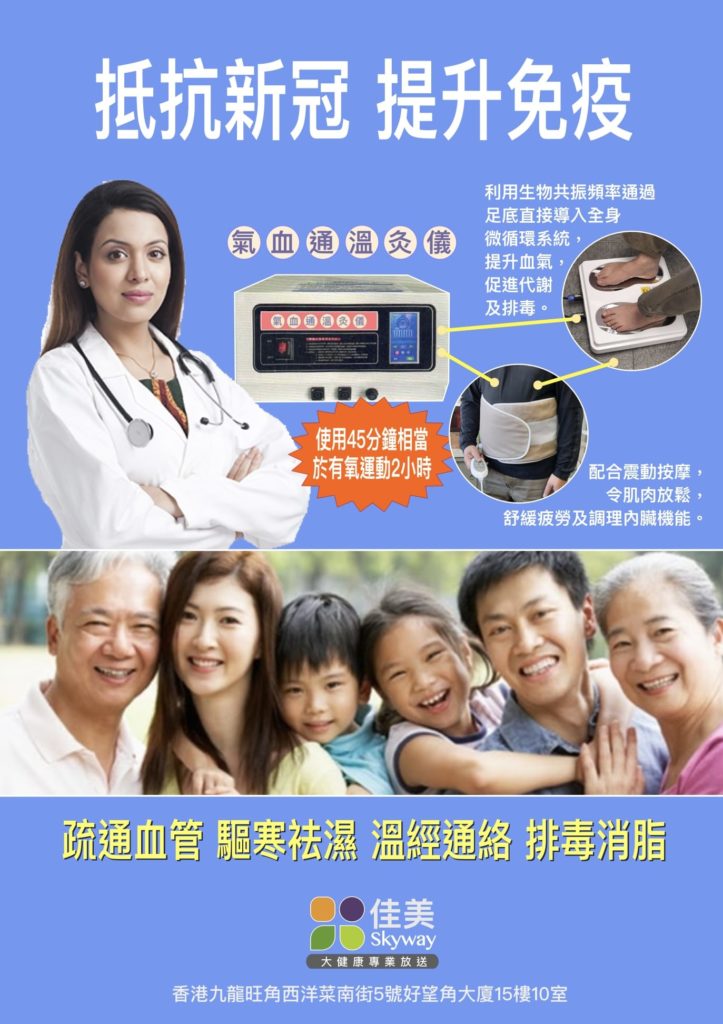
“Wen Tong” is a traditional Chinese medicine conditioning method. It uses warming meridians to unblock collaterals and improve the metabolism of yin-cold stagnation in the body to improve the effect of the microcirculation system. The effects include: removing cold and dampness, increasing blood flow, improving immunity, and nutrient absorption. , anti-inflammatory and pain relief, live dishes to remove blood stasis, improve joint elasticity, etc., especially suitable for improving the health of sub-healthy people. “Qi and blood Simulation Machine” outputs special biological resonance waves and energy into the body. Combined with the principles of traditional Chinese medicine, the energy field formed by the energy resonance waves is introduced into the human body through the channels of the meridians and acupoints of the feet and feet, and acts on the blood vessels of the body to generate temperature and promote blood circulation. , Improve the single-point introduction method of ordinary hyperthermia equipment, so that energy waves are evenly introduced into the body, and health is significantly improved.
Address: Room 10, 15th Floor, Cape of Good Hope Building, No. 5 Xiyangcai South Street, Mongkok, Kowloon, Hong Kong
Welcome to contact for appointment, Tel: (852) 51140565
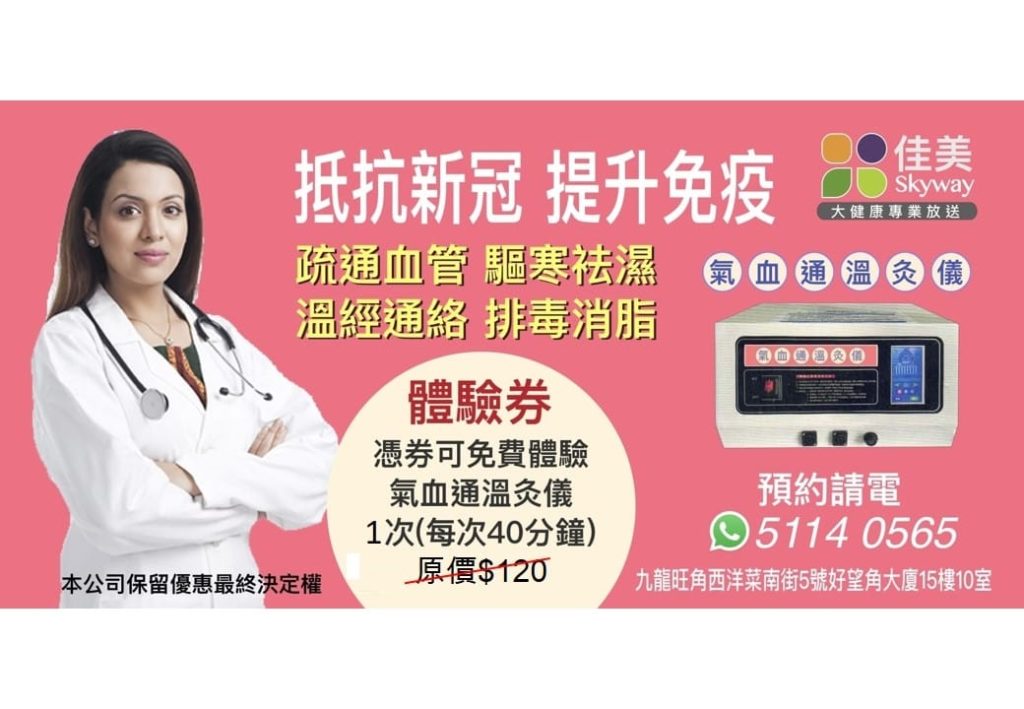
Recommend “Qi and Blood Simulation Machine” Free trial