Spooky2 Biofeedback Scan is a powerful tool for listening to your body and discovering what frequencies are best suited for you. To suit people with different needs, there are currently four ways to run biofeedback scans.
Pulse Scan
The Pulse Scan uses changes in the heart rate to monitor the body’s response to a particular frequency.
When a frequency stresses your body, it will be shown as an increase in your heart rate during a pulse scan. On the other hand, a decrease in your heart rate indicates that a frequency has calmed your body by sharing the same energy property.
With Spooky2 Pulse, if you run a frequency scan and one or more of its frequencies produce sympathetic resonance with pathogens or parasites, the subject will always have a low level of stress response. These subtle changes are immediately and recorded by Spooky2 Pulse’s heart rate monitor.
When the scan is complete, Spooky2 Pulse will then go through its list of “hits” and sweep carefully around them to find the exact frequencies that produce these tiny stress reactions.
Advantage VS disadvantage
You can run Pulse Scan with both XM Generator and GeneratorX. The choice is up to you. In terms of effectiveness, a Pulse Scan is suitable for scanning your whole body. However, Pulse Scan lasts about 40 minutes, and it relies on the changes in heart rates. Any form of body movement will cause heart rate fluctuations, even if it is a sneeze.
Therefore, we recommend that you stay still to get more accurate results. Most people find it not quite convenient when following this requirement.
Preparations for Pulse Scan:
- Spooky2-XM Generator *1
- Spooky2 Boost *1
- Spooky2 Tens Cable *1
- Spooky2 Tens Pad *1
- Spooky2 Pulse Ear Clip Option or Spooky2 Pulse Finger Clip Option *1
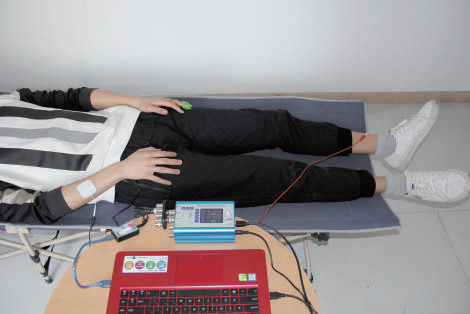
Detailed steps to do a Pulse Scan: https://www.youtube.com/watch?v=nOgvVFSgoyE
GenX Scans
Currently, there are three types of GenX Scans using different Spooky2 accessories, which respectively are GX TENS Scan (using TENS pads), Sample Scan (using Sample Digitizer) and Scalar Scan (using Spooky2 Scalar).
GenX Scans results record the changes of electrical signals. If there is a frequency resonating with a pathogen in your body, a subtle change in the electrical pattern will demonstrate a hit is detected and recorded in the scan result.
Advantages vs. disadvantages
On average, the running time for a GenX Scan is about 6 minutes, and the scan results are usually more accurate. GenX Scan is more suitable for local scans compared with Pulse Scan.
GX TENS Scan
GenX TENS Scan shares a similar connection and settings with Pulse Scan.
Preparations for GX TENS Scan:
Click to watch the detailed steps of running a GenX TENS Scan: https://www.youtube.com/watch?v=ArxDJO3eyq8
Related blogs:https://www.spooky2-mall.com/blog/what-are-the-differences-between-pulse-scan-and-gx-tens-scan/
Sample BFB Scan
Since there are some inconveniences when running Pulse Scan and GenX TENS scan, we have introduced Sample Scan to avoid any physical limitation. You only need one Sample Digitizer to run Sample BFB Scans.
The working principle of Spooky2 Sample Digitizer is similar to Remote mode and is compatible with direct GenX scanning of biological samples (urine, saliva, blood, etc.). Due to the high ratio of pathogens within the biological sample, Spooky2 Sample Digitizer is better suited than TENS scans for finding pathogens in your body.
However, the effectiveness of using Sample Digitizer to run BFB results is not ideal. For this reason, we recommend using proper Spooky2 Remote, plasma, or contact modes to run your scan results.
Preparations for Sample BFB Scan:
- Spooky2 GeneratorX *1
- Spooky2 Boost *1
- Spooky2 Sample Digitizer *1
- Spooky2 Sample Digitizer Replacement Slides *1
- Spooky2 Remote v2.0 *1
How to Run Sample Digitizer Scan and Run Preset Using Remote:
Related blog:https://www.spooky2-mall.com/blog/spooky2-sample-digitizer-guidelines/
Scalar BFB Scan
Spooky2 Scalar Biofeedback scans are special. The Spooky2 Scalar Digitizer measures tiny changes to the scalar field around you during scalar frequency scans. Frequencies that invoke changes to the scalar field will be recorded. These changes indicate subtle scalar reactions within your body. When you are doing a Scalar Biofeedback scan, only one GX is required since it has two generators in one. Generator 2 modulates the scalar field, and Generator 1 measures the response.
It is best to lie perfectly still when doing a Scalar Biofeedback scan and make sure that you only have one person in the scalar field. To ensure the accuracy of your scan result, please also keep your pets away during the scan.
Preparations for Scalar BFB Scan:
How To Do Scalar Biofeedback Scan Using Spooky2 Scalar Digitizer:
Related blogs:https://www.spooky2-mall.com/blog/new-product-released-spooky2-scalar-digitizer/