We have better take care of our body in order not to burden our lover, family and society due to illness.
Sincerely Recommend Spooky2/MiraMate/Lifewave Frequency Health Care devices, we also has professional nurse to provide health care and nutrition advice (Inquiry Click Here).
The Spooky2 molecular weight database (MW) is a collection of more than 13,000 programs covering pharmaceuticals, essential oils, vitamins and minerals, and those are important to health. Running the MW program will simulate the action of this species, not remove it. If you run a MW nutritional program with minerals, essential oils, etc., the duration doesn’t matter, they are natural and your body can flush out any excess. However, if you run the MW drug frequency, we recommend that you run it once, then give your body time to absorb the effects, and then give yourself another “dose” if necessary.
Drugs are man-made chemicals that are not known to occur in nature, and many believe that using drug frequency rather than physical substances will prevent nasty drug side effects, but have yet to see evidence of this. Therefore, extreme caution should be exercised when experimenting with these drug frequencies, and under no circumstances should drug programs be set to run remotely uninterrupted, if any adverse effects become apparent, you may be too far away from the Spooky2 rig to terminate the program. It is a good idea to run Adverse Drug Reaction XTRA alongside any drug program and it may help reduce serious side effects of the drug.
Bedsores (pressure ulcers) are injuries to the skin and underlying tissue, primarily caused by prolonged pressure on the skin. They can happen to anyone, but usually affect people who are bedridden or in a chair or wheelchair for extended periods of time. Bed sores can be treated in a variety of ways, depending on the stage. Frequent repositioning and keeping the area clean, dry, and free of irritation is important to promote healing.
Welcome to listen the following sound frequencies will help relieve swelling or tenderness in your skin, it is recommended to listen at least 2-3 times a day, keep the moderate volume at a comfortable level to prevent any hearing damage, make sure you have enough lemonade or pure Water to flush toxins from your body.
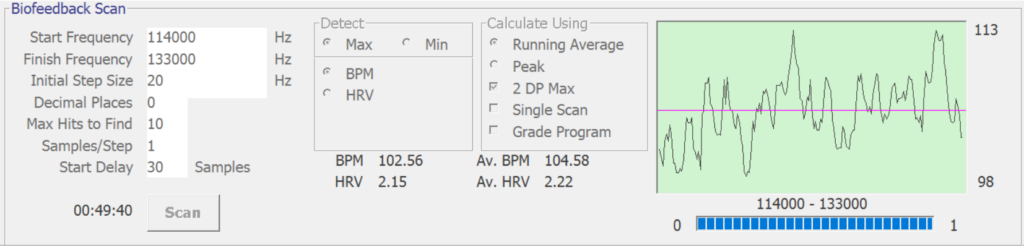
The smallest bacteria are about 0.4 microns (millionth of a meter) in diameter, while viruses range in size from 0.02 to 0.25 microns. Typically, less than 0.01% of the linear paths between TENS pads contain the same type of pathogen cells. Pathogen cells have little effect on the overall electrical signal. Spooky2 GX biofeedback has a high threshold designed to eliminate false hits detected from noise spikes. Since the GX Pro’s electrical noise is greatly reduced, you can set the hit threshold to zero, and every small signal peak will be correctly reported as a hit.
Additionally, Spooky2 GX Pro has an extended PCB that can preprocess biological scan (BFB) data. It converts the BFB current and phase angle analog signals into a serial digital data stream that is intrinsically noise immune. Spooky2’s R&D team is constantly working to improve our products. The new version of the extended PCB contains more precise resolution and better sensitivity. The data is very clean and accurate, with a better signal-to-noise ratio. With noise effectively eliminated, every tiny bump and spike in the signal indicates information from your body, and all new GX Pros come with this improved extension PCB installed.
The Spooky2 GX Pro differs from its old version of GX in many ways, the GX uses discrete components to measure current and phase angle, and each of them adds “electrical noise” to the measured signal, the technical term for this is Johnson-Nyquis Special noise (Johnson-Nyquist noise). Johnson-Nyquist noise produces many spikes in GX, from Wikipedia explain: “Johnson-Nyquist noise (thermal noise, Johnson noise, or Nyquist noise) is caused by the internal Electronic noise produced by thermal perturbations of charge carriers (usually electrons), which occur regardless of the applied voltage. Thermal noise is present in all electrical circuits, in sensitive electronic devices such as radio receivers can swamp weak signals and can be the limiting factor in the sensitivity of electrical measuring instruments.”
In simple words, current flowing through any conductor or semiconductor creates electrical noise, and the higher the resistance, the louder the noise. This is unavoidable and not the result of poor quality components, e.g. a 100 ohm resistor will have more noise than a 1 ohm resistor, no matter how the resistor is made. The GX Pro uses multiple fast microprocessors to directly measure current and phase angle. Fewer components and digital signal processing greatly reduces Johnson-Nyquist noise, resulting in smoother GX Pro BFB graphs.
Lastly, Spooky2 guarantees that the Spooky2 software has never had data filtering mechanisms to amend its chart smoothing, and will never.
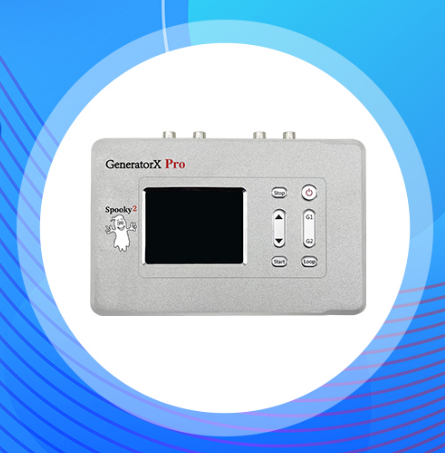
Spooky2 GeneratorX Pro can run in standalone mode, which means you can run the program without being connected to a computer, follow the steps below to learn how to use GeneratorX Pro in standalone mode.
Step 1: Load the program into GeneratorX Pro
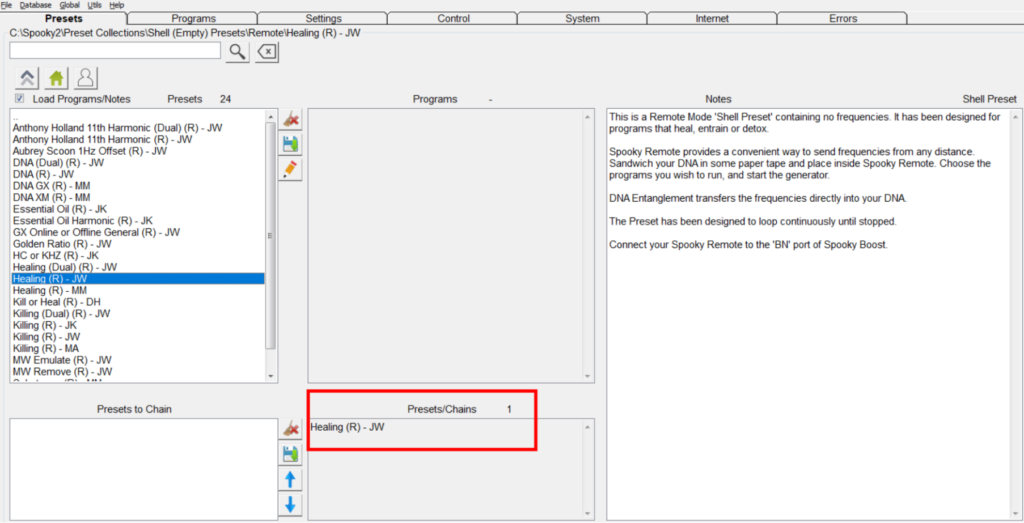
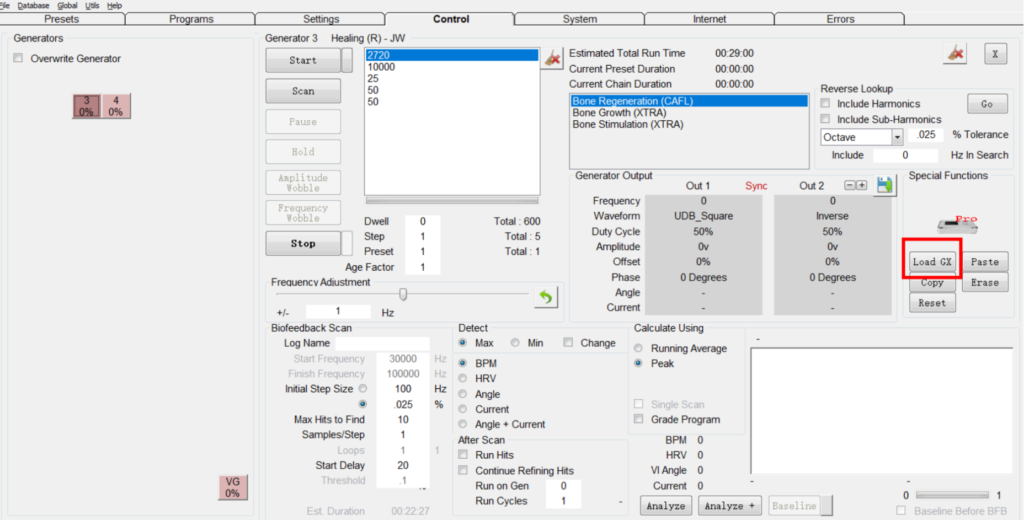
First, complete the hardware connection, turn on Spooky2 GeneratorX Pro, open the Spooky2 software, go to the “Control” tab, you will find that two generators have been detected. Go to the Presets tab and select an Empty Shell Preset if desired. For example, I would choose Healing(R) – JW (Healing(R)-JW) to help my bones.
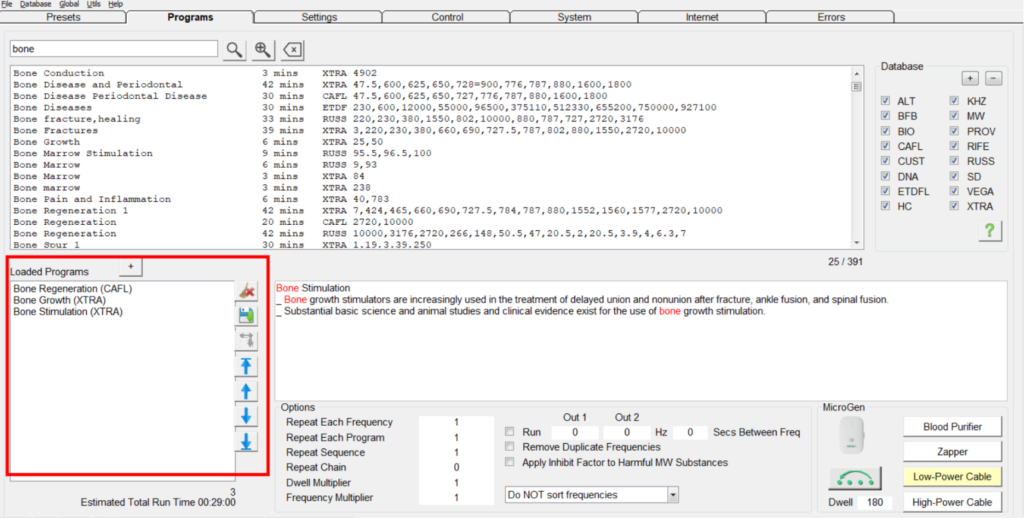
Then, go to the programs tab, search for the keyword “bone” and you will find many related programs. Double-click or click the “+” button on the program you want to load. You’ll see the programs added to “Loaded programs” in the lower left corner. Double check that these programs are exactly what you want before proceeding to the next step.
Go to the Controls tab, select Override Generator, select one of the two generators on your GeneratorX Pro, it doesn’t matter whether you choose Generator #3 or Generator #4. They all share the same program. In this example, I will select Generator #3.
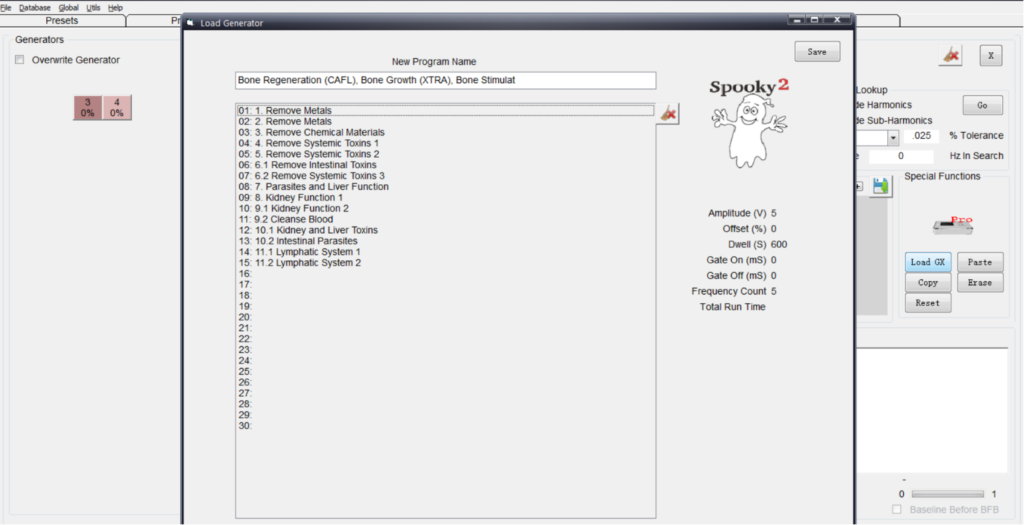
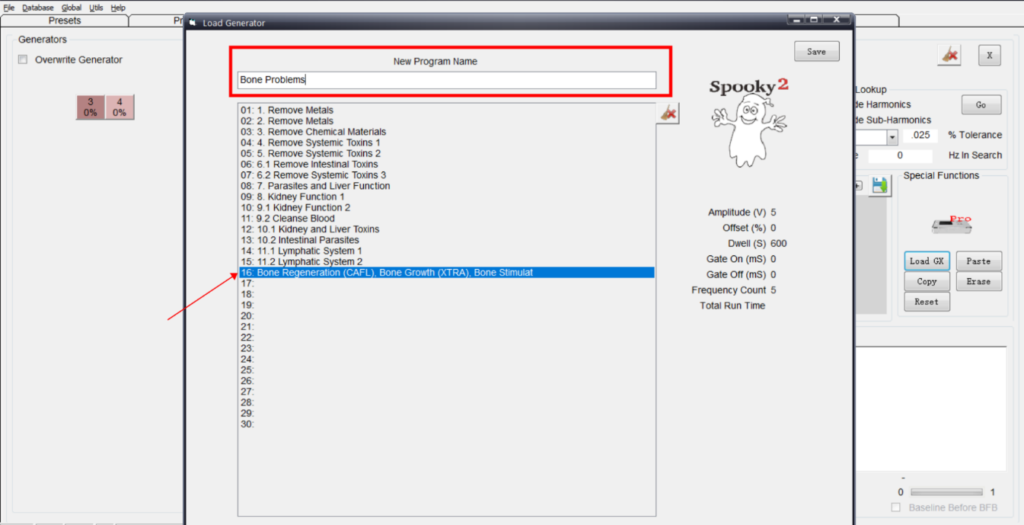
Click “Load GX” and you’ll see a new window pop up. Under “New program name,” give your new program a name so you can remind yourself what this program is about. If not, it automatically combines all program names into the title. Here I named the program “Bone Problem”, double click where you want to store the program, you can store your program in 30 places, you can also overwrite the existing program, however, all these programs should be in within the limit of 200 frequencies. Here I’ll put them at position 16, press save now. The Load Generator Box will close and the changes will be sent to your GeneratorX Pro.
Repeat the above operations, one GX Pro can download up to 30 programs.
Step 2: Run the program in standalone mode
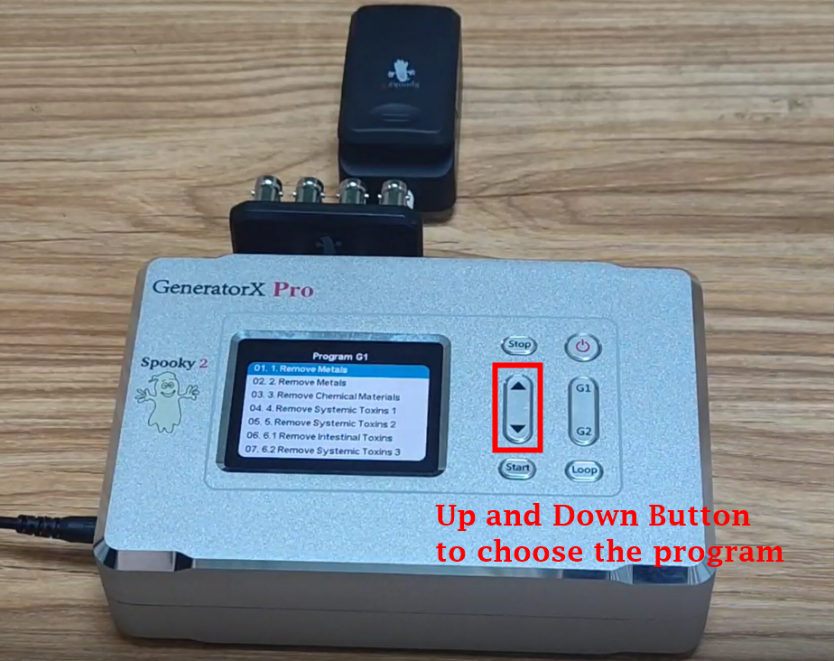
Once the download is complete, close the Spooky2 software and disconnect the GeneratorX Pro from the computer, connect the Spooky2 Boost and Remote to one of your GeneratorX Pro’s generators, then place your DNA sample into the Remote. Press the “G1” or “G2” button and you will see all the programs that have been loaded into GeneratorX Pro. Use the “Up” or “Down” button to select the program to run. Here I’m going to choose “Bone Problem”. Press the “Start” button and you will see the program ready on the G1. Then press the “Loop” button. “Run (Start)” means that the program is running. Now the program will run 24/7 until you manually stop it.
Appendix: There are a few things to note.
Each program is limited to 200 frequencies.
In a program, each frequency will use the same waveform, amplitude, offset and duration (dwell).
You should keep your computer connected if you want to run scans, colloidal silver, or biofeedback scans.
The Out 2 signal will be the inverse of Out 1. You cannot use Out 2 for modulation of Spooky2 Central Plasma. However, special presets are available to allow these machines to run using Out 1.
When you connect Plasma to a standalone GeneratorX, it is suitable for frequencies over 100,000 Hz. For lower frequencies, they are boosted to harmonics above 100 kHz. Therefore, if the frequency is lower than 100 kHz, it is better to use an online GX plasma.