We have better take care of our body in order not to burden our lover, family and society due to illness.
Sincerely Recommend Spooky2/MiraMate/Lifewave Frequency Health Care devices, we also has professional nurse to provide health care and nutrition advice (Inquiry Click Here).
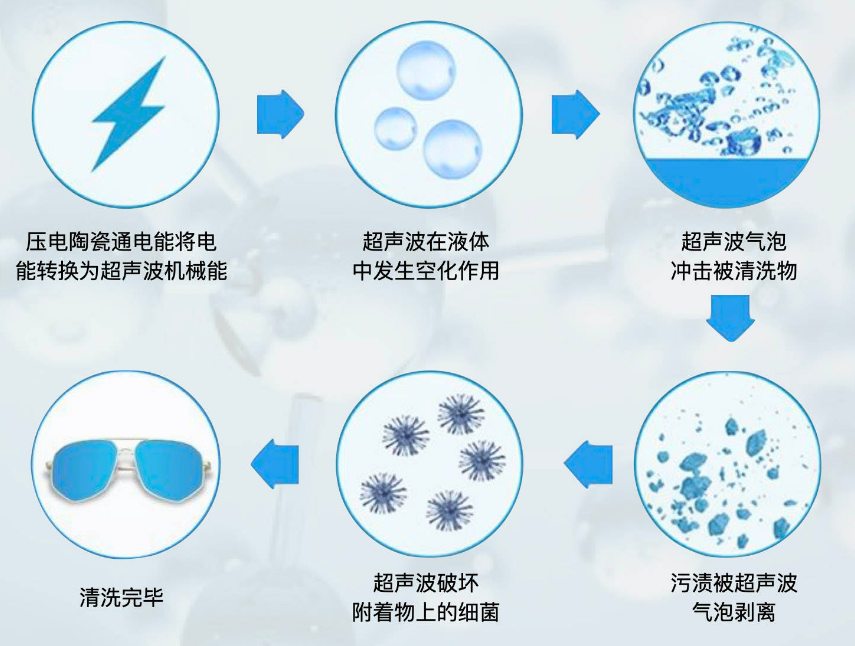
Cavitation phenomenon, also known as ultrasonic cavitation, is the effect of high temperature, high pressure, discharge, luminescence and shock waves caused by the collapse of holes formed in the liquid. Cavitation formation factors may be: strong ultrasonic irradiation, shock during explosion, high-speed fluid impact friction or violent chemical reaction, etc. Cavitation can be used to promote chemical reactions, crush suspended solids in liquids, make emulsions, and kill bacteria. Ultrasonic cleaning has long been widely used.
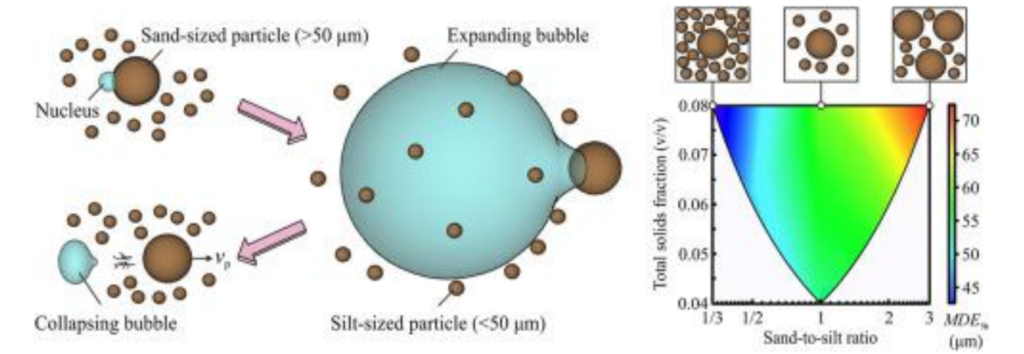
Ultrasonic cavitation refers to the dynamic process of growth and collapse of micro-air nuclei cavitation bubbles existing in liquids that vibrate under the action of sound waves, and when the sound pressure reaches a certain value. Cavitation generally includes three stages: formation, growth and violent collapse of cavitation bubbles. When a container filled with liquid is passed through ultrasonic waves, tens of thousands of tiny bubbles, namely cavitation bubbles, will be generated due to the vibration of the liquid. These bubbles grow in the negative pressure zone formed by the longitudinal propagation of ultrasonic waves, and quickly close in the positive pressure zone, thereby being compressed and stretched under alternating positive and negative pressures. At the moment when the bubble is compressed until it collapses, a huge instantaneous pressure will be generated, generally as high as tens of megapascals to hundreds of megapascals. Suslick et al. measured that cavitation can make the temperature of the gas-phase reaction zone reach about 5200 K, the effective temperature of the liquid-phase reaction zone reach about 1900 K, the partial pressure is 5.05×10kPa, and the temperature change rate is as high as 10K/ s, accompanied by strong shock waves and micro jets with a speed of 400 km per hour. This huge instantaneous pressure can cause rapid damage to the solid surface suspended in the liquid. Ultrasonic cavitation is usually divided into two types: steady-state cavitation and instantaneous cavitation: steady-state cavitation refers to cavitation bubbles generated when the sound intensity is low (generally less than 10w/cm), and its size is within its equilibrium size Oscillates nearby, generating periods of up to several cycles. When it is expanded to make its own resonance frequency equal to the frequency of the sound wave, the maximum energy coupling between the sound field and the bubble occurs, resulting in obvious cavitation. Transient cavitation refers to cavitation bubbles with a short life cycle (mostly occurring within one sound wave cycle) generated under the action of large sound intensity (generally greater than 10w/cm ).
After a long festive feasting period, it’s time to bring your health back into balance with water and we want to advocate the MAGic logic of water fasting. Benefits of water fasting include:
Weight Loss
Body Detox
Health Reset
Spiritual and Mental Rejuvenation
Here’s a 3-Day Water Fasting regimen for you and your loved ones to try with our MagHealy Water Application.
Stage 1 – How to begin a water fast
The 48 – 36 hours before the fast are important to prepare the body and mind. Beginning to implement a 16 hour fast for the day or two before will give your body time to adjust and cut down the intake of energy intensive food to process. By eating light, whole food meals (fruits and vegetables) and not consuming any processed foods, you will allow your body to better capitalise on the benefits of the fast and make the most of the experience for autophagy and cell renewal.
Stage 2 – Activate your water throughout the day
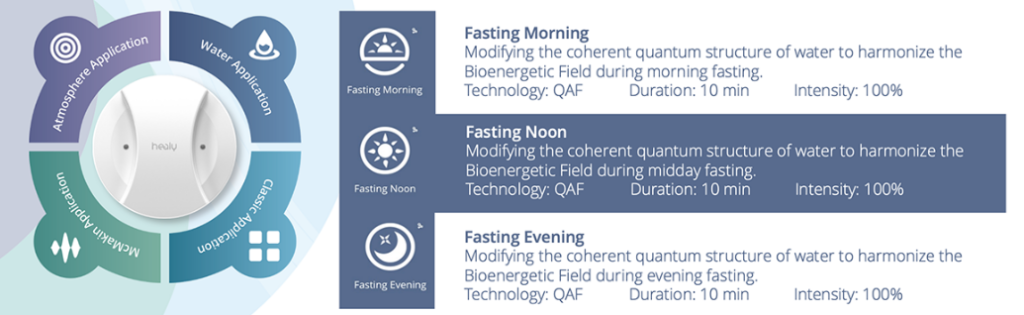
Use the Fasting Morning/ Noon & Evening program to modify the coherent quantum structure of water to harmonize the Bioenergetic Field during different times of the day. Drink 9 – 13 glasses of water a day. If you get strong hunger pangs, work through it by drinking 1-2 glasses of water. Then lie down and rest. The craving will usually pass. You can also try distracting yourself by reading or meditating.
Stage 3 – Break your fast slowly and gradually
By Day 3, break your fast with orange or lemon juice first. Then proceed to add foods to your diet gradually. Eat small amounts about every 2 hours, at first. Proceed in a stepwise process from easily digested foods to foods that are harder to digest. Thereafter, return into your normal lifestyle by following a diet high in fruits, vegetables, and whole grains, and low in bad fats and refined sugar. Exercise for 30 minutes at least 3 days a week.
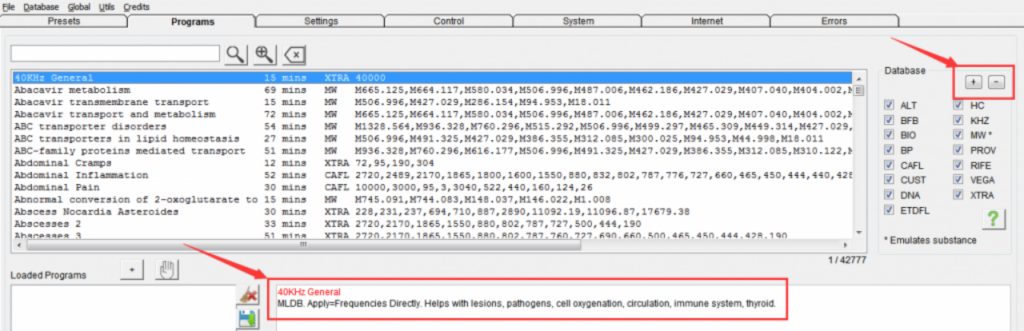
For any Spooky2 (Rife) frequency therapy, the most important procedure is to use the correct frequency in a clean enough and accurate form to produce therapeutic effects, for example, CAFL, KHZ, BIO, etc., which are the names of various frequency sources, their details Described as follows:
ALT consists of programs based on Ayurvedic knowledge and practice, solfeggios, and planetary frequencies.
BFB holds your biofeedback scan results.
BIO is based on excellent Russian frequency research.
BP holds more than 12,000 programs for human, animal, and plant pathogens based on their base pair values.
CAFL is the Consolidated Annotated Frequency List, amassed from the experience of Rife experimenters over years.
CUST consists of programs added by Spooky team members, plus those in your own personal database.
DNA is a collection of about 1,650 programs that target DNA using a method developed by the Spooky2 Team.
ETDFL is a collection of programs researched by bio resonance clinics in Germany.
HC is Dr. Hulda Clark’s database. Use with HC or KHZ (R) – JK preset.
KHZ is a collection of higher frequencies from Dr. Hulda Clark. Use with HC or KHZ (R) – JK preset.
MW is a collection of about 6,500 programs for drugs, supplements, and molecules important to health.
PROV has produced consistent results in virtually all subjects it was used with.
RIFE is a collection of Dr. Royal Raymond Rife’s original frequencies.
VEGA is based on excellent Russian frequency research.
XTRA is a collection of programs from various sources, all chosen for their reputation for effectiveness.
The main database of Spooky2 is composed of the above 15 sub-databases. It is the largest frequency database in the world, with 42,000 programs, and it is still being updated. In addition, each Spooky2 user can customize his own frequency program according to his own situation. If you want to include them all in your search, click the “+” button, you can also tick only the ones you want to include, to deselect all subdatabases at once so you can quickly select a few to search, Please click the “-” button. When you choose a program, the descriptions below will also help you find the right one.
Many users are confused about the Spooky2 remote’s LED not lighting up, why it stops working, etc. There are four factors that determine how the LED responds to the signal: Frequency, Waveform, Offset and Amplitude, let’s explain it in detail as follows:
Frequency
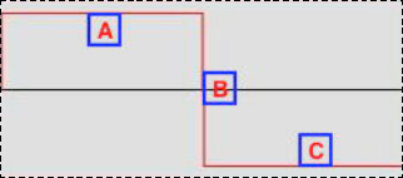
1. This is a 1Hz square wave, it completes a positive to negative cycle every second,
A: The signal is positive for half a second, so the left LED light is on for half a second.
B: The signal drops from 0 to a negative value immediately.
C: The signal is negative for half a second, so the right LED light is on for half a second.
Both LED lights turn on and off very slowly and it is impossible to turn them on at the same time.
2. Now, this is a 32Hz square wave – it completes 32 positive and negative cycles per second. Count the peaks – there are 32, in other words the entire A-B-C cycle above repeats 32 times per second, which means for each of those 32 cycles, the signal is positive for 1/64 of a second, so the left LED is on 1/64 second, then the signal goes negative for 1/64 second, so the right LED lights up for 1/64 second. Now the LEDs are all blinking rapidly, though it’s always the case that only one of them is lit at a time.
Note that if you use a Wave Cycle Multiplier of 12, the frequency sent to the 5M will be divided by 12, now let’s take that up a notch.
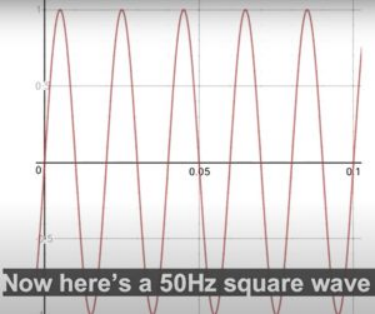
3. This is a 50Hz square wave – it does 50 positive and negative cycles per second, count the peaks – there are 50, so the entire A-B-C cycle above repeats 50 times per second, which means that for those 50 cycles Each cycle in , the signal is positive for 1/100 of a second, so the left LED is on for 1/100 of a second, then the signal goes negative for 1/100 of a second, so the right LED is on for 1/100 of a second. Each LED will now be lit continuously at the same brightness, however, as explained before, two LEDs cannot be lit at the same time. You may think that both lights are on at the same time, but in fact, what you see is an illusion caused by the limitations of the human eye.
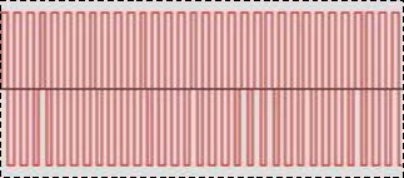
4. This is a 256Hz square wave, note that what you see on an oscilloscope is not exactly like this – what we are encountering here is the resolution limit of the computer screen, however, in one second 256 cycles brought each peak so close to each other that the PC screen could not show any degree of separation between them. Now, the original A-B-C positive-negative cycle happens 256 times per second, and for each of those 256 cycles, the signal is positive for 1/512 of a second, so the left LED lights up for 1/512 of a second. The cycle then goes negative for 1/512 of a second, so the right LED is on for 1/512 of a second. When we transmit very high frequencies in the megahertz range, we run into a different type of limitation — this refers to millions of cycles per second: the limitations of some of our technology today. At high MHz frequencies the cycle switches from positive to negative so quickly that the LED light cannot fully turn on before receiving the signal to turn off again, so in these cases the LED signal is very dim and may even appear completely off. The MW, BP and DNA databases are very high frequency, so when you run them with Spooky2 Remote, usually no lights will come on. This doesn’t mean that Spooky2, Generator or Remote won’t work properly. This is simply because current LED light switch technology isn’t fast enough to keep up with extremely fast signals, so don’t worry if this happens to your Spooky2 product.
Amplitude
There is another case where the LED may be very dim or not even bright – and this case does not involve very high frequencies at all. Every time an LED lights up, it uses a small fraction of its frequency power, known as amplitude, also known as voltage. When the amplitude is above 5 volts, you won’t see any difference in the brightness of the LED lights, however, if you set the amplitude below 5 volts, the voltage available to turn the LED lights on is reduced and as a result they look It will be very dark. At very low amplitudes, the LED signal light will be so dim that we can barely see it. For example, we run a 40Khz volt LED with a 20V amplitude and it’s bright. If we change the amplitude to 5V then the LED light will dim, if we set the amplitude to 1V then no LED light will show. If this happens to your Spooky2 product, don’t worry. This is a good sign that all frequency voltages are being used for healing.
Waveform
The waveform will also affect the LED lights, if a square wave is selected and run at 5.8Hz the lights will blink. If we change the waveform to a square H-bomb, the LEDs will blink with a short break in between.
Offset
Another factor is offset, which is about the imbalance between the positive and negative peaks of neutral or zero. Offsetting a signal from zero (neutral) means moving the waveform into the positive or negative region. In this case, if we set it to 100%, the signal will not go into the negative zone. If we set it to -100%, the signal will not enter the positive zone. Therefore, only one remote signal LED will light up.
What should we do when the LED on the Spooky2 remote does not light up?
If the LED indicator on your Spooky2 remote does not light up, you can follow the steps below to check if your Spooky Remote is working properly. Try running something with the JW – Killing (Remote) preset as a test, as this uses more voltage, and see if the LED lights up. If not, here’s a list of things you can check, organized by the most likely reason why your remote isn’t lighting up.
The cable or boost connection to the generator is secure.
Make sure the connector locks onto the pins.
Make sure the generator toggles from off to on in the top and bottom boxes of the display when the channel starts running.
Make sure inverse+sync is selected for Column 2 in the software. If it happens to be set to Follow Out 1, the waveforms will cancel out.
On the generator’s display, make sure each box in the second row shows a frequency other than 0. If the display shows F=00″000″000.00, this usually indicates that the generator is not communicating properly with the Spooky2. Please check the link here to resolve your issue: http://www.spooky2support.com/hc/en-us/articles/219379077
A screenshot of the config in use and the contents of the channel control window at runtime would do a good job of pinpointing the problem, try the other remotes in the kit, if it lights up and when you switch back the other doesn’t light up, Then there may be a real problem with your remote.