
When you open the Spooky2 software, you need to select the correct generator in the “Control” tab. When running the program, you may notice the different colors of the generator icon. What do the colors mean? The following figure shows the colors and their corresponding meanings.
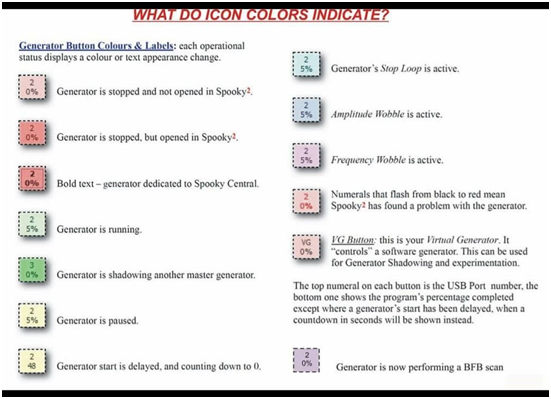
Shadowing Another Master Generator
Shading means that this generator follows the leading position of another generator in the emission frequency. If you want to double the frequency of another generator, you can use the shadow to send two harmonic-related frequencies at the same time, or when you need to send When using different waveforms at the same frequency but at the same time, the shadow will produce different harmonic propagation. Shading also allows other complex transformations of the dominant frequency on the generator. For example, the main generator sends the main frequency remotely, and then the second shadow generator converts the frequency into harmonics on the PEMF coil.
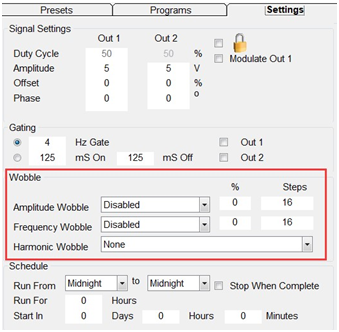
Wobble
When you try to kill pathogens frequently, they may activate their defense mechanisms and become difficult to kill. In this case, their resonant frequency may change slightly, and they can avoid the specified fixed frequency. Therefore, you need a frequency range to eliminate them. Frequency swing can extend the frequency to the frequency range where these cunning pathogens can be eradicated. Amplitude swing will change the resonance intensity, causing more trouble to the pathogen, making it unable to adapt to the frequency. Both forms of swing are designed to deal with pathogens that are difficult to kill. You can activate the swing on the “Settings” tab. Enabling swing in the final stage of treatment can help remove stubborn pathogens. For example, four days after flu frequently occurs, you feel better, and then you can enable swing to kill the remaining viruses. Generally speaking, you only need to select one wobble at a time. We do not recommend using wobble with Plasma.
Stop Loop
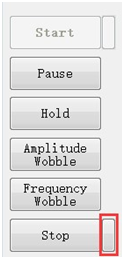
Spooky2 runs in a loop, in other words, when all frequencies are completed, the program will return to the first frequency. If you only want to run a loop, you can press the small button to the right of the “Stop” button on the “Control” tab. Activate the stop loop.
Virtual Generator
The button is labeled “VG” instead of a number like other generators. It is a “fake” generator because it is not connected to the Spooky2 generator and therefore cannot transmit frequency. It is used as an experimental tool, you can try to run the program or shadow to understand the controls. You can now try to use VG to view various icon colors.